Why Descript is the Secret Weapon for the Camera-Shy Creator 🚀
How to edit video like a Word doc and finally bypass the "technical friction" that keeps you hidden | 1

Christopher here. Let’s get real about why you’re still hiding behind a microphone or a blog draft.
I don’t think it’s because you don’t have a story to tell. It’s because the word ‘video’ is immediately followed by a terrifying, friction-filled image: The Dreaded Timeline..
We’ve all been there—staring at complex waveforms and a thousand tiny knobs in programs like Final Cut Pro, feeling like you need a film degree or a three-inch manual just to cut out a mistake. It took me years to get comfortable with high-level editing, and I still haven’t mastered every feature.
But I recently heard someone refer to that feeling as ‘technical friction.’ It’s what triggers our survival instincts, making the camera lens feel like a ‘cold eye’ that is watching and judging our every mistake.
The Pivot: Video is just Text.

To move from ‘camera-shy’ to ‘camera-hi,’ we have to stop thinking like editors and start thinking like writers—which many of you already are! Here are the three pillars of the Video | Podcast Lab workflow that will change how you see the lens:
1. Edit Your Video Like a Word Doc
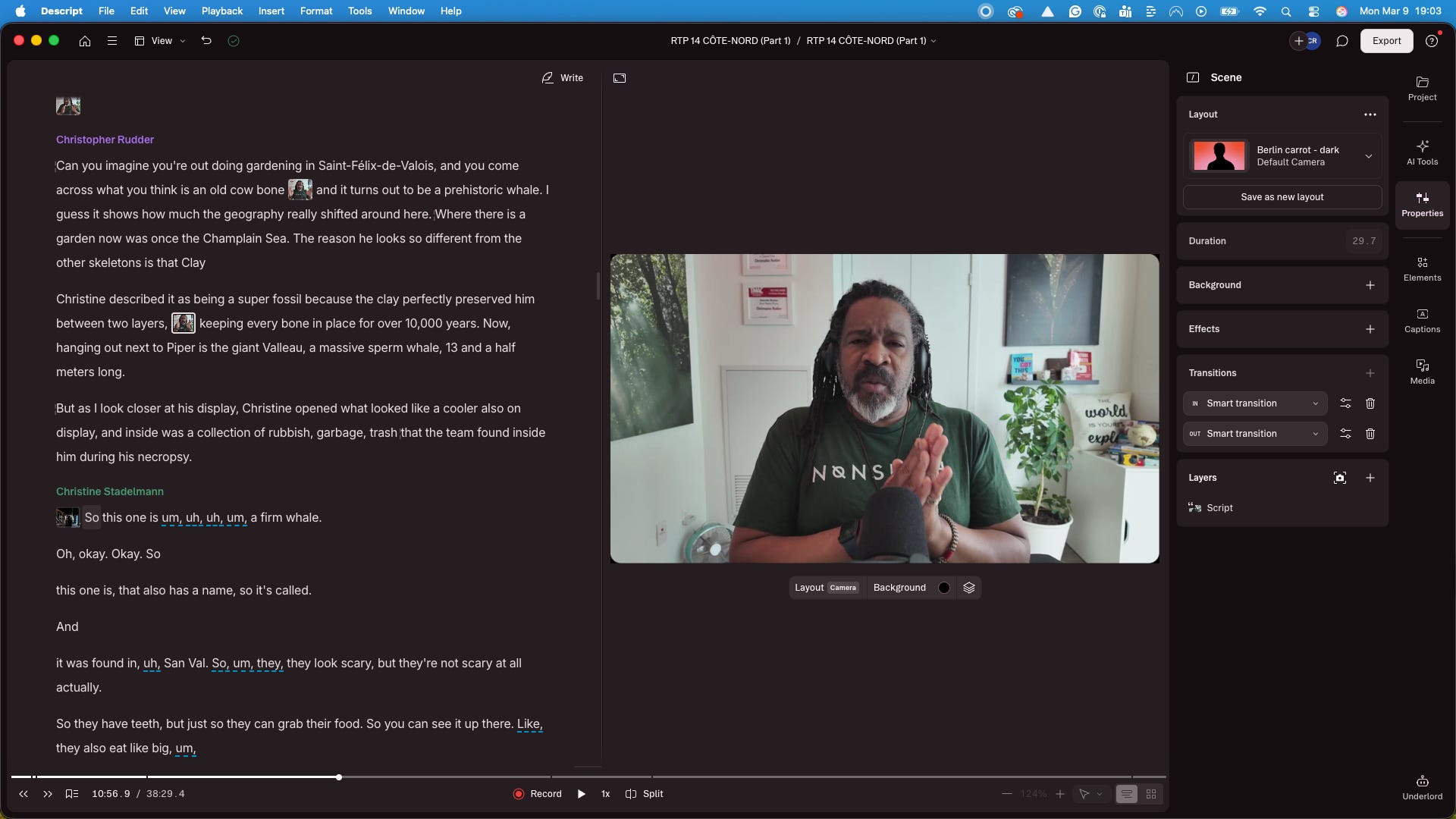
The true breakthrough for a hesitant creator is transcription-based editing. When you import your footage into Descript, you aren’t looking at confusing waves; you’re looking at a script.
Delete the ‘Ums’: If you stumbled or said ‘um’ five times, you simply highlight the text and hit delete. The video segment vanishes instantly.
Proofread Your Face: You are essentially ‘proofreading’ your physical presence. This replaces a high-friction technical task with a skill you already have: basic word processing.
2. The ‘Overdub’ Safety Net
This is the ultimate tool for psychological safety. Descript allows you to create a clone of your voice. If you realize you mispronounced a name or made a mistake, you don’t have to set up the lights and camera again. You simply type the correction into the script, and the AI ‘pastes’ over the error seamlessly. Knowing you have this safety net makes hitting ‘record’ feel 10x less risky. Full disclosure, I use this ALL the time!
Please note this works well with a word or two, not an entire paragraph.

3. The Video Flywheel: Your 24/7 Discovery Machine
In 2026, recording a long-form video is only half the battle. Like it or not, trust me, I hate it, but you need to be visible where discovery happens: YouTube, Apple, Spotify, social media. Using AI-driven ‘Magic Clips,’ you can turn one recording into 20 social media assets in minutes.
“I realized that it wasn’t the camera judging me: I was judging myself and blaming it on an inanimate object.” — Kenneth Carter, Ph.D.
In his article, From Camera Shy to Camera Hi!, Dr. Carter explores the ‘psyphotology’ of the lens. He reminds us that the camera is a ‘cold eye’ that doesn’t provide the human signals we need to feel safe. But when you use a tool that lets you hold the ‘eraser,’ the camera stops being a judge and starts being an object you control.

Monday’s Mission Possible: The 60-Second Eraser
You don’t need a Hollywood production to be confident.
Record: Open your laptop and talk for 60 seconds about your biggest technical fear.
Import: Drag that file into Descript.
Delete: Find one sentence you hate, highlight it in the text, and hit ‘Delete’.
The ‘cold eye’ of the lens isn’t so scary when you realize you are the one holding the eraser.
Hit reply and tell me: Does the idea of ‘editing like a Word doc’ make you more likely to hit record this week? I’m reading every response.
If you decide to try it out, I do have an affiliate link right here, which helps support the Lab at no extra cost to you. But whether you use my link or not, the goal is the same: just start.
— Christopher